Available Now

LatticeColor

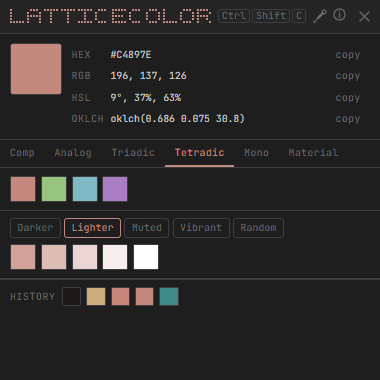
Pick any color you see on screen, get its hex, RGB, HSL, and OKLCH values instantly, and explore palettes that work with it — all from a compact panel that stays out of your way.

LatticeColor — app screenshot
Features
Global eyedropper
Pick from any pixel on screen — across any open app — with a single hotkey or button click. No focus switching required.
🔍
Pixel-perfect magnifier
The screen freezes and a 10× zoom follows your cursor with a pixel grid overlay so you land exactly on the color you want.
📋
Four color formats
Hex, RGB, HSL, and OKLCH — all shown at once, all copyable in one click. No mental math, no converter tabs.
🎨
6 palette types
Complementary, analogous, triadic, tetradic, monochrome, and a Material-style tonal ramp — generated instantly from any base color.
🔄
Palette variants
Shift any palette darker, lighter, muted, or vibrant — or spin it to a random harmony — with a single click.
🕐
Color history
Your last five picks are always visible. Click any to restore it as the base and re-explore its palette without re-picking from screen.
How It Works
01
Trigger the eyedropper
Press the global hotkey from any app. The screen freezes instantly — no need to switch focus or move windows out of the way.
Ctrl + Shift + C
02
Click any pixel
A magnified cursor shows a pixel grid at 10× zoom. Move to the exact color you need and click. Esc cancels with no side effects.
Screen zoom + pixel grid
03
Explore the color
Hex, RGB, HSL, and OKLCH appear immediately. Pick a palette type to see complementary colors, then shift the whole palette darker, lighter, or muted.
Values + palette + variants
Get It
Download LatticeColor →

Windows 10 / 11  ·  64-bit  ·  Free forever  ·  Open source